How to stop being late to back-to-back meetings
With back-to-back meetings you are late for two reasons: the meeting before runs over, and the zero-minute gap leaves no time to find the next link. The fix is a signal at both ends - one before the current meeting ends, and one you cannot miss before the next one starts.
Why back-to-back meetings make you late
- The previous meeting overruns. Nobody in the room is watching the clock for your next meeting.
- There is no gap. A meeting that ends at 11:00 and one that starts at 11:00 leave zero minutes to switch.
- The link is buried. Finding the call link in the invite takes another minute you do not have.
1. Build a gap into your calendar
In Google Calendar's settings, speedy meetings ends new events early: 5 minutes for meetings under an hour, 10 minutes for longer ones. It only shortens meetings you create, but over a week it adds up to real breathing room.
2. Get a signal before the meeting ends
Someone has to call time. With Pro, Just In Time shows a wrap-up pill 5 minutes before a meeting ends - “Time to wrap up · 1:1 with Maya is next” - so you can start closing the discussion instead of noticing the overrun at the end.
3. Make the next start impossible to miss
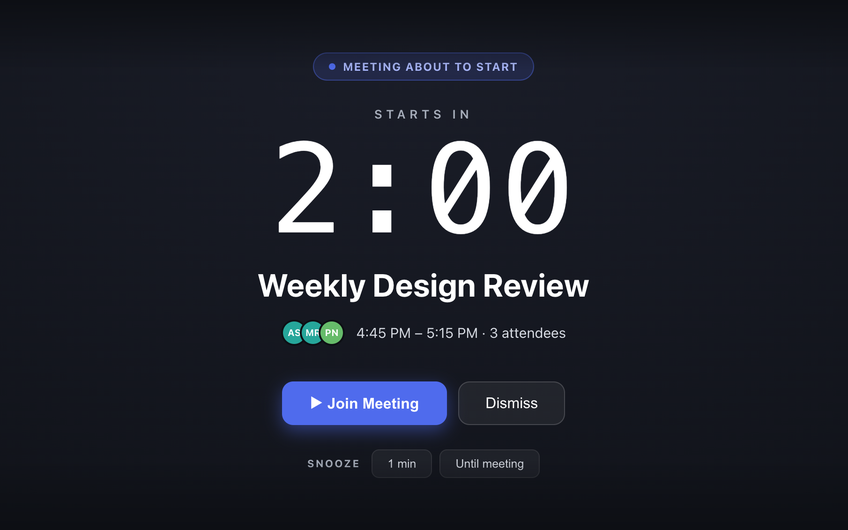
Just In Time gives you a heads-up 10 minutes before each Google Calendar meeting, then covers your Mac screen 2 minutes before it starts, with a Join Meeting button for Zoom, Google Meet or Microsoft Teams. One click and you are in, with no hunting for the link.
4. Decide which meetings deserve the interruption
Not every meeting in a back-to-back day matters equally. With Pro, rules give the meetings you run an earlier block and the ones you only attend just a heads-up, and “Don't block” turns the block off for one meeting or a whole series.
Common questions
How do I stop being late to back-to-back meetings?
Fix both ends of the gap: get a signal a few minutes before the current meeting ends, and an unmissable one right before the next starts. Shortening meetings with Google Calendar’s speedy meetings setting also builds a small buffer between them.
What is speedy meetings in Google Calendar?
A Google Calendar setting that makes new events end a few minutes early - 5 minutes early for meetings under an hour, 10 minutes for longer ones - so back-to-back meetings leave a short break.
Can Just In Time remind me before a meeting ends?
Yes, with Pro. A wrap-up pill appears 5 minutes before a meeting ends and names the next meeting.