Meeting rules: choose which meetings take over your screen
Just In Time Pro has meeting rules. A customer call can get the full-screen block 5 minutes early, a 1:1 with your manager 3 minutes early, a review you only attend just a heads-up, and evenings nothing at all. Start from a one-click quick setup, or write custom rules of your own.
Why one reminder for every meeting is not enough
A full-screen block 2 minutes before every meeting is right for most days. But a sales call with a customer deserves more runway than a team standup, and a 40-person all-hands you only listen to does not need to take over your screen at all. Rules let the reminder match how much each meeting matters.
Quick setups
One click turns each on. Each one becomes an ordinary rule you can edit or delete.
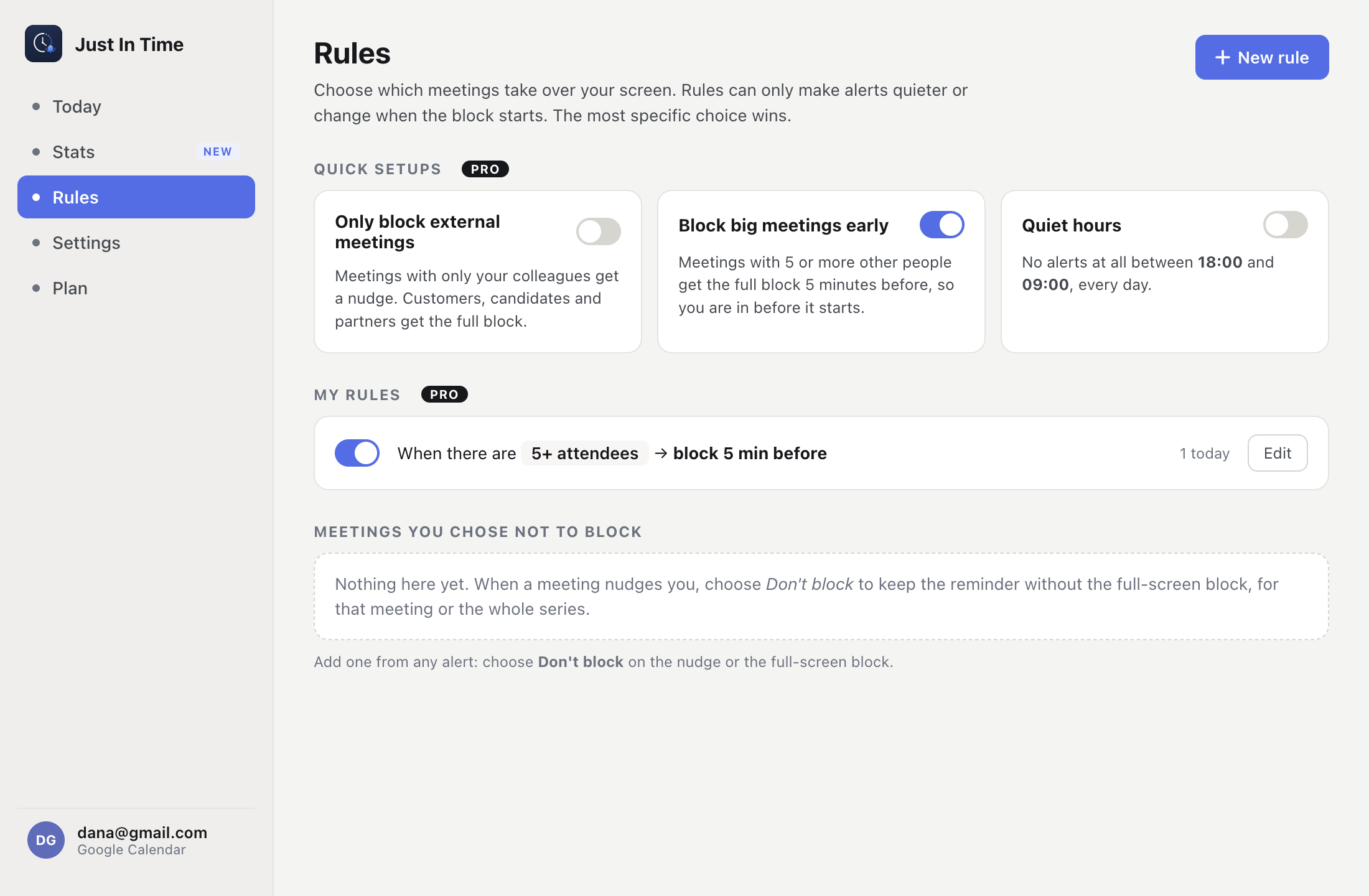
- Only block external meetings: meetings with only your colleagues get a nudge; customers, candidates and partners get the full block.
- Block big meetings early: meetings with 5 or more other people get the full block 5 minutes before, so you are in before it starts.
- Quiet hours: no alerts at all between 18:00 and 09:00, every day.
Custom rules
A custom rule is one or more conditions and one action. When every condition matches a meeting, the action applies. A rule can match:
- a word in the meeting title, such as “1:1” or “Interview”
- whether anyone from outside your company is invited, or only colleagues
- the number of other attendees, such as 5 or more, or nobody else
- a specific person, or anyone from an email domain
- meetings you organize, or meetings a specific person organizes
- which of your calendars the meeting is on
- Google Calendar Focus time events
- a time window on chosen days of the week
And the action is one of:
- Block earlier or later: the full-screen block any time from 1 to 30 minutes before the start
- Nudge only: the heads-up as usual, never the full-screen block
- Skip: no heads-up and no block
Every rule reads back as a sentence - “When there are 5+ attendees → block 5 min before” - so the Rules list says exactly what will happen.
“Don't block” for one meeting or a series
Sometimes a rule is too much. From any alert, choose “Don't block” to keep the heads-up but drop the full-screen block, for that meeting or the whole recurring series. The most specific choice wins: a single meeting over its series, a series over your rules, and rules over your general settings.
Rules are part of Pro
Rules, quick setups and “Don't block” come with Pro, alongside your own alert timings, sounds and snooze lengths, the countdown pill, the wrap-up reminder, up to 10 calendars and full Stats. See Pricing for the plans.
Common questions
Can a meeting reminder treat different meetings differently?
Yes. Just In Time Pro has meeting rules: you choose which meetings get the full-screen block, which get only a heads-up, which get the block earlier, and which get no alert at all. Rules can match the title, attendees, a person or email domain, the organizer, the calendar, Focus time events or a time of day.
Can I write my own rules?
Yes. Besides the one-click quick setups, Pro lets you create custom rules. Each rule combines one or more conditions with an action, and reads back as a plain sentence, such as “When there are 5+ attendees → block 5 min before”.
Are rules part of the Free plan?
No, rules are a Pro feature. On Free, your rules are kept but paused, and the defaults apply: a heads-up 10 minutes before and the full-screen block 2 minutes before every meeting.
Can a rule make an alert louder?
No. Rules can only make alerts quieter or change when the block starts. Declined meetings never alert, and events with no other attendees never get the full-screen block, whatever the rules say.